
Is Your Mac Acting Up? The macOS Fixes We Handle at Our Manor Shop
May 18, 2026
Dropped Your Phone in Water? Here’s What to Do (and What Not to Do)
July 12, 2026
Stop Diagnosing on a Laptop. Start Diagnosing on a Bench Tool.
BenchTool is a self-contained Raspberry Pi diagnostic station with an 800×480 touchscreen and 65+ offline repair tools — PS5 Syscon decoding, iOS panic log analysis, SPI NOR flashing, UART sniffing, HDMI diode sweeps. No driver hell. No forum tabs. No $1,000+ proprietary box. It boots to a big-button UI and it works with the Wi-Fi off.
- One box instead of a laptop, four dongles and six browser tabs — console, phone and chip work on the same screen. Nothing else spans all three.
- No laptop. No install. No browser. No internet. It boots straight to the tool and works with the Wi‑Fi off — measure it in time‑to‑first‑error‑code.
- Still shipping. The main open‑source console tool hasn’t had a release since March 2024. Check that date yourself, then check our changelog.
- One price, forever. No credits, no licence clock, no annual reactivation — and shop job tracking is in the box, not another $99‑a‑month subscription.
Ships assembled. Software preloaded. $25 flat UPS within the US · Free local pickup in Manor, TX · International orders: additional shipping may apply.
Your Bench Laptop Is a Liability. Here’s the Receipt.
Every tech has the same setup: a beat-up Windows laptop, eleven browser tabs, a folder called TOOLS_v3_FINAL, and three USB-serial drivers fighting over COM4. It works — right up until it costs you a two-hour job.
| Bench Reality | Old Setup: Laptop + Downloaded Utilities | BenchTool |
|---|---|---|
| Boot to first diagnostic | Boot, sign in, launch, find the EXE, plug in, pray the COM port enumerates. | Power on, tap the category card, start reading. |
| Syscon error log decode | Copy hex, paste into a forum thread, cross-reference a 2019 spreadsheet, guess. | Tap Console → Syscon. The error code decodes to the failing rail and part on screen. |
| Driver / dependency management | CH340, FTDI, Prolific clones, Python 2 scripts, .NET runtime errors. | Zero. Plug the dongle in — live USB detection picks it up in the launcher. |
| Working offline | Half your tools are web-based. Shop internet drops, bench stops. | Every diagnostic runs fully offline. Wi-Fi is optional, not required. |
| Customer data handling | Photos, backups, and drive images scattered across a shared laptop’s C: drive. | Writes strictly to external USB. Nothing customer-related ever lands on the Pi’s SD card. |
| Tool updates | Re-download, re-verify checksums, hope the dev didn’t abandon it. | 1-tap OTA update from the Settings card. |
| Bench footprint | Laptop, hub, four dongles, tangled leads, no free space for the board you’re actually fixing. | One 800×480 box. Dongles plug into the side. Your mat stays clear. |
| Cost of entry | “Free” — plus the $1,000+ proprietary console you eventually buy anyway. | $280–$400. One time. |
| Shop-wide visibility | Sticky notes and one tech’s memory. | Sentinel repair desk on shop Wi-Fi — tickets, live bench status, searchable repair history. |
The laptop isn’t cheaper. It’s just billed in lost hours instead of dollars.
Four Benches in One Box
The launcher opens to color-coded category cards — Phone, Console, PC, Utilities, Sentinel, Settings — with live USB detection and built-in help on every screen. Here’s what’s behind them.
Console & Board-Level
Where the money is. Where the guessing stops.
- Diagnose PS5 power faults against Sony reference values. PS5 Power Diag walks you rail by rail, by symptom, so you’re probing with a target voltage — not a hunch.
- Decode Syscon and EAP error logs over serial for PS5, PS4, and PS3. Raw codes resolve into the failing subsystem and the part to check next.
- Read and modify PS5 NOR through a CH341A clip. Pull the dump, patch it, write it back — no separate Windows programmer app.
- Capture Xbox POST/SMC codes live — One, One S/X and Series S/X — with code lookup on screen.
- Sweep HDMI ports automatically in diode mode. BenchTool walks every pin and flags shorted or open lines against known-good readings.
- Test and calibrate DualSense and Xbox controllers at hardware level. Confirm stick drift objectively, then recalibrate — no “feels fine to me” callbacks.
- Map unknown boards with Board View. Upload board files, capture golden-board readings from a working unit, and navigate guided diagnostics visually.
Smartphone & iOS Panic Diagnostics
Answer “is this worth fixing?” before you open it.
- Read true battery health and cycle count over USB. No root. No teardown. No third-party app that lies to your customer.
- Analyze iOS panic and crash logs with the built-in decoder. It maps panic strings to the failing hardware domain and recommends the specific IC or rail to inspect — turning a wall of text into a repair plan.
- Identify MediaTek devices offline through BROM and Preloader detection. Know exactly what’s in front of you when the screen is dead and the label is gone.
- Run guided hardware verification before and after the job — documented on the unit, so the QC argument never happens.
- Extract customer photos straight to USB and pair wireless ADB by QR code without touching a shop PC.
PC, Chip & Firmware Engineering
A full board-level toolkit that fits next to your microscope.
- Flash SPI NOR and BIOS chips with the bundled CH341A programmer. Read, verify, erase, write — straight from the touchscreen.
- Capture 8 channels of logic and sniff UART with the ESP32-S3 analyzer. Watch the bus instead of theorizing about it.
- Restore Apple Silicon Macs over DFU, including macOS recovery, straight from the bench unit.
- Recover failing drives with ddrescue, image sector by sector, and clone what’s left before it’s gone.
- Build bootable USB installers without commandeering the front-counter PC.
- Monitor thermals and validate repairs with the utilities suite, including USB-C port diagnostics.
Sentinel Repair Shop Desk
Your bench data, turned into shop infrastructure.
- Open Sentinel from any phone or PC on the shop Wi-Fi. It’s a browser-based repair desk served straight off the BenchTool — nothing to install, no cloud account.
- Track tickets end to end and see live bench status without walking to the back.
- Build a searchable shop repair database automatically. Every diagnostic you run pools into shop history, so the fifth PS5 with the same fault is a lookup, not an investigation.
- Turn one tech’s findings into every tech’s baseline. The database is searchable from any device on the network — nobody re-solves a fault the shop already solved.
- Add optional Gemini AI log analysis by loading your own free API key from a USB stick. No key, no problem — every core tool runs without it.
- Reading check turns a photo into a verdict. Pick what’s on the bench, photograph the meter, and get a single PASS or FAIL against a known-good sample — a whole USB–C port in one pass, with the reasoning underneath instead of in front.
- Bench screen. Watch — and drive — the bench’s touchscreen live from the dashboard, so the front counter can run a tool without walking to the back.
- One job, one card. Records sharing a ticket fold into a single card with the bench work listed on it, look-alike captures from the same console merge on request, and sessions with nothing logged in them drop into a drawer instead of cluttering the board.
- Ask for a review without being pushy. A QR on the pickup screen and the printed summary, or a pre-written request you send from your own phone. Nothing goes out automatically, and the bench never records who reviewed you.
Plug It In. The Bench Already Knows.
Every BenchTool watches its own USB ports. Connect an iPhone, a DualSense, a CH341A clip, a customer’s SSD — and Smart Auto-Assist works out what class of thing it is and puts the handful of tools that actually apply to it on screen as big touch buttons. Nobody walks the menu tree to get to the obvious next step.
Footer indicator only, exactly like before. Nothing pops up, ever.
A dismissible banner slides up: “iPhone connected — tap for options.” This is the shipped default.
A full prompt with the suggested tools as buttons. Fastest when you want zero taps wasted.
One tap on the AUTO chip on the home screen cycles all three. Your choice is remembered across reboots and survives OTA updates.
What it offers, by what you plugged in
| What lands on the bench | What Auto-Assist puts on screen |
|---|---|
| iPhone — normal | Crash Analyzer · iOS Diagnostics · iOS Backup · Photos → USB |
| iPhone — recovery / DFU | Apple Silicon Restore · iOS Device Resetter |
| Android — ADB | HW Verify · Device Identifier · Smart Data Pull · Adware Remover |
| Samsung — download mode | Samsung Log Diag · Samsung Battery |
| USB–TTL / UART adapter | PS5 UART · PS4 UART · PS3 UART · Xbox 360 · UART Sniffer |
| CH341A programmer clip | Chip Programmer · EEPROM Analyzer |
| ESP32-S3 dongle | Xbox POST codes · ESP32 Flasher · Logic Analyzer · UART Sniffer |
| DualSense / Sony pad | DS Calibrator · Drift Tester · Button Tester |
| Xbox pad | Xbox Calibrator · Rumble Tester · Button Tester |
| Blank USB stick | USB Drive Writer · Drive Formatter · HATS SD Pack |
| Drive with data on it | Data Puller · Drive Clone · Data Recovery · File Manager |
| SD card | HATS SD Pack · Drive Formatter · Data Puller |
The same device in a different USB mode gets a different answer — an iPhone in DFU is a restore job, not a backup job, and the bench knows the difference. Storage is read the same way: a blank stick, a drive with a filesystem, and an SD card are three different suggestions. The bench’s own OS disk is excluded, so it never offers to format itself.
Connected isn’t the same as reachable.
A phone can enumerate on USB and still be useless to you. When an iPhone hasn’t been trusted, or an Android has USB debugging off or unauthorised, Auto-Assist doesn’t hand you a tool list that will just sit at “waiting for device” — it tells the tech exactly what to do on the handset (“Unlock, tap Trust This Computer, enter the passcode”), with a Retry button that re-probes on the spot. Clear the block and the device re-reads as a fresh arrival, this time with the real tools.
Built to stay out of your way
- Fires once, on arrival. Edge-triggered with a debounce, so a phone re-enumerating through normal → recovery → DFU doesn’t stack up prompts.
- Never interrupts real work. It only speaks up on the home screen — never over a running tool or an open dialog.
- Remembers “don’t ask again” per device, so replugging the same customer drive stops nagging while a different drive still prompts.
- Fails soft by design. Detection is isolated from the launcher. If anything in it errors, the bench drops back to the plain footer indicator and keeps running — it can’t stop the unit from booting.
Try the Bench UI Right Now
This is the real menu tree at its native 800×480 — every hub, every tab, every tool, in the same order your techs will find them. Tool screens are captures from a running unit.
Demo only — nothing connects to real hardware. Home
Show all 65 tools — the full menu tree
Exactly what a tech sees on the bench, in menu order. A few tools are deliberately linked into more than one menu — USB Drive Writer sits under both console menus and PC Tools, and Apple Silicon Restore appears under iOS Data as well as Apple, because it DFU-restores iPhones and iPads too.
📱 Phones 17
Android
- HW Verify (Android)
- Device Identifier
- Samsung Battery
- Samsung Log Diag
- Adware Remover
- Smart Data Pull
iOS Diagnose
- iOS Diagnostics
- Crash Analyzer
- Panic Diagnoser
- HW Verify (iOS)
- iPad Battery
iOS Data
- iOS Backup
- Photos to USB
- iOS Device Resetter
- Apple Silicon Restore
Basic Phones
- Feature Phone
- Smart Flip
🎮 Consoles 17
PlayStation
- PS5 Power Diag
- PS5 UART
- PS5 NOR
- PS4 UART
- PS3 UART
- PS2 PMAP
- USB Drive Writer
Xbox
- Xbox UART
- Xbox Drive Prep
- XBFS Export
- Xbox 360 Drive
- USB Drive Writer
Controllers
- DS Calibrator
- Drift Tester
- Button Tester
- Xbox Calibrator
- Rumble Tester
💻 PC 14
Storage & Data
- USB Drive Writer
- Windows USB
- Drive Formatter
- Drive Clone
- HATS SD Pack
- Data Puller
- Data Recovery
Chip Programming
- Chip Programmer
- EFI Unlock
- EEPROM Analyzer
- UART Sniffer
- Logic Analyzer
Apple
- Apple Silicon Restore
- Mac Share Pull
🔧 Utilities 9
Testing
- Validator
- HDMI Tester
- USB-C Port Diag
- Thermal Monitor
Network
- PiHole Router
Repair & Flash
- Ryobi Unbricker
- DJI Recalibrator
- ESP32 Flasher
- RP2040 Flasher
My Apps
- App Store
- App Installer
- + your own apps
🗺 Sentinel 1
- Sentinel Shop Desk
Screensavers
- Time Circuits
- Pip-Boy
- Game Day
⚙ Settings 12
Software & Updates
- Firmware Update
- File Manager
- Import API Key
- Export Logs
System
- System Monitor
- Printers
- Wi-Fi
- Screensaver
Power Options
- Restart
- Power Down
- Exit to Desktop
- Desktop Mode
The Hero Dashboard — the shop’s second screen
The touchscreen is where the work happens. The Hero Dashboard is where the shop happens. Every bench serves it over your own Wi-Fi — scan the QR on the bench, or just open the address on any phone, tablet, or desktop on the network. Nothing to install, no cloud account, no per-seat fee. It is the keyboard and the big screen the touchscreen never had.
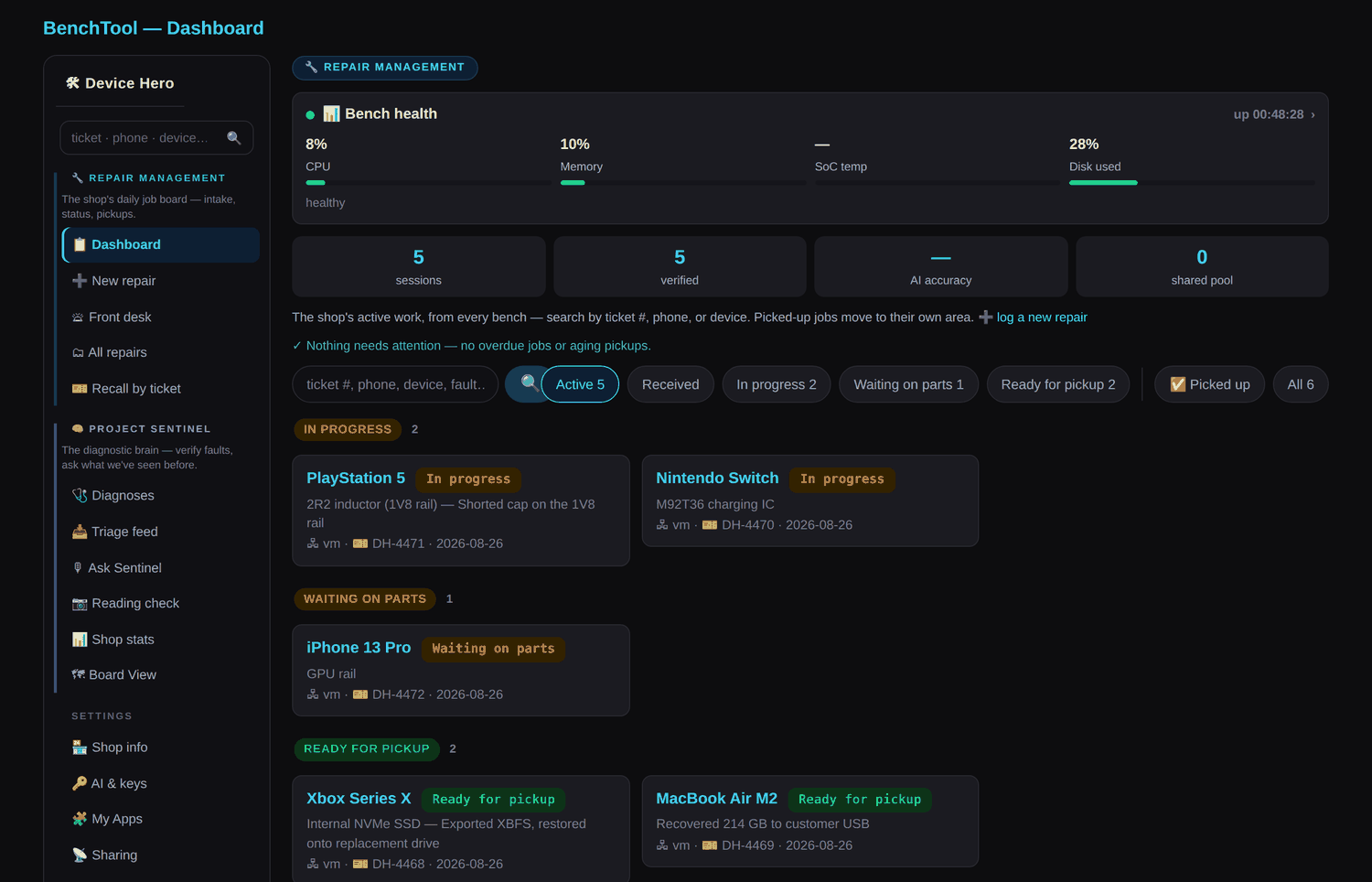
That sidebar is the clearest explanation of how BenchTool is put together, so it’s worth reading before anything else on this page.
Half one — Repair Management: the shop’s daily job board
Intake, status, pickups. Every device in the shop on one board, grouped by where it actually is — in progress, waiting on parts, ready for pickup — and pulled from every bench, not just the one you’re standing at. One search box finds any repair on the network by ticket number, phone number, or customer name. There’s a front-desk view for whoever is at the counter, printed customer summaries and receipts, and recall-by-ticket for when someone comes back three months later holding a receipt and a grievance.
It comes in three levels the owner chooses: Off, Lite, and Full. Lite keeps BenchTool out of the customer-identity business entirely — an optional phone number and a ticket #, with your POS staying the system of record. Full turns on a real front desk with names on tickets and a per-customer history. Either way the contract holds: customer data lives on your benches, syncs only across the shop LAN, and is stripped from every shared pool and cloud path.
Half two — Project Sentinel: the diagnostic brain
This is the half people mean when they ask what makes BenchTool different from a box of utilities. Project Sentinel is the memory and the judgment: it remembers what the shop has already fixed, and it helps decide what’s wrong with the thing in front of you now.
It shows up in the sidebar as a handful of doors into the same brain. Diagnoses is every fault this shop has confirmed. The Triage feed carries a walk-in check from the front counter to the tech in the back within seconds. Ask Sentinel answers a device-and-symptom question from your own repair history first, your curated references second, and the wider verified pool third — and it answers in bench language, naming parts, readings and test points rather than telling you to try a factory reset. Reading check takes a photograph of your meter and returns a single PASS or FAIL against a known-good sample. Board View opens a real boardview file on a big screen with net highlighting, golden-board readings and guided diagnosis. Shop stats shows what techs are asking and where the knowledge gaps are.
The important part is the loop between the two halves. The diagnostic tools on the bench file what they saw; a tech confirms what it actually turned out to be; that verified pair becomes shop memory; and the next time the same fault lands, Sentinel already knows. The fifth PS5 with the same error code is a lookup instead of an investigation. Sentinel is not a separate product you buy — it ships inside BenchTool and runs on the bench itself, with no internet required. What it optionally connects to is the public Repair-Sentinel pool, where shops that opt in share human-reviewed repair knowledge with each other.
The Bench Doesn’t Stop at 65 Tools
BenchTool ships with an App Store built into the launcher and a full App SDK behind it. Install what another shop already built, write your own, or describe one in plain English and let the AI builder write it for you. Every app you add is a first-class citizen — same folder layout, same manifest, same rules as the built-ins.
🛍 App Store
Utilities ▸ My Apps ▸ App Store
- Browse and install community apps straight from the touchscreen. No phone, no dashboard, no SSH — scroll the list, tap INSTALL.
- Works with the network down. The catalogue is already on disk, pulled in by the bench’s normal 10-minute sync. Only the ⟳ SYNC button needs internet.
- Screensavers too. Apps flagged as screensavers join the picker in Settings ▸ System with a ▶ TRY IT preview, and the idle timer runs them.
- Clean removal. Store-installed apps uninstall from the same screen; your own original work is managed separately so it can’t be wiped by accident.
🧩 App SDK
One folder. One manifest. One Python script.
- Write a standalone Tkinter script and drop it in a folder with an
app.json. It appears in My Apps the next time you open Utilities — no reboot, no rebuild, no access to the BenchTool repo. - Crash-isolated by design. Every app runs as its own process, exactly like the built-in tools. If yours dies, the menu comes straight back and shows the exit code — it can never take the launcher down.
- Use the real bench stack. Serial, USB, GPIO and ADB are all reachable, and the shared theme modules give you the same fonts and colors the built-ins use.
- Declare your own dependencies. Extra pip packages install into your app’s private folder, never into BenchTool’s environment — so your pinned versions can’t break anything else, and removing the app removes them with it.
✨ AI App Builder
Describe the tool. Read the code. Tap install.
- Describe a tool in plain words from the Hero Dashboard and your shop’s configured AI writes it against the SDK contract, validates it, and shows you the code before anything is installed.
- Refine what’s already running. Tell the AI what to change about an installed app and it reworks that version in place — same folder, same logs.
- Update in place from a newer .zip without the delete-and-reupload dance, or export any app to hand to another bench.
- Build off-bench instead. Download the AI Dev Kit — generated fresh from your own unit, so it carries that bench’s Pi model, OS, Python version and installed packages. Paste it into Claude or ChatGPT and build from your laptop.
🌎 Community Pool
One shop solves it. Every bench gets it.
- Publish an app to the shared pool with one action from the dashboard. It queues instantly and uploads on the next sync, so a dead connection never blocks you.
- Approved apps reach every bench automatically through the same sync that keeps the rest of your unit current — nobody has to go hunting for a download.
- Your apps survive updates. They live outside the BenchTool install, so firmware updates can’t clobber them and they can’t break an update.
- Everything is logged. Each app writes its own log on the bench and rides along in Export Logs like any built-in tool.
- The pool is real, and growing fast. Roughly 150 approved entries and 88 reference images today — mostly distilled knowledge cards (the fault, the readings that prove it, the procedure, the part numbers), each carrying a link back to the source it came from.
- Reviewed by a human, and audited. Nothing reaches the pool without a maintainer approving it, and customer-identifying fields are stripped by rule rather than by remembering — the current pool contains no customer names, serials, IMEIs or phone numbers anywhere in it.
What’s actually in the store right now
The App Store isn’t a promise about a future ecosystem — there are apps in it today, written by shops that aren’t us, reviewed by a human, and published with a SHA-256 hash so a bench can verify it installed what the maintainer signed off on.
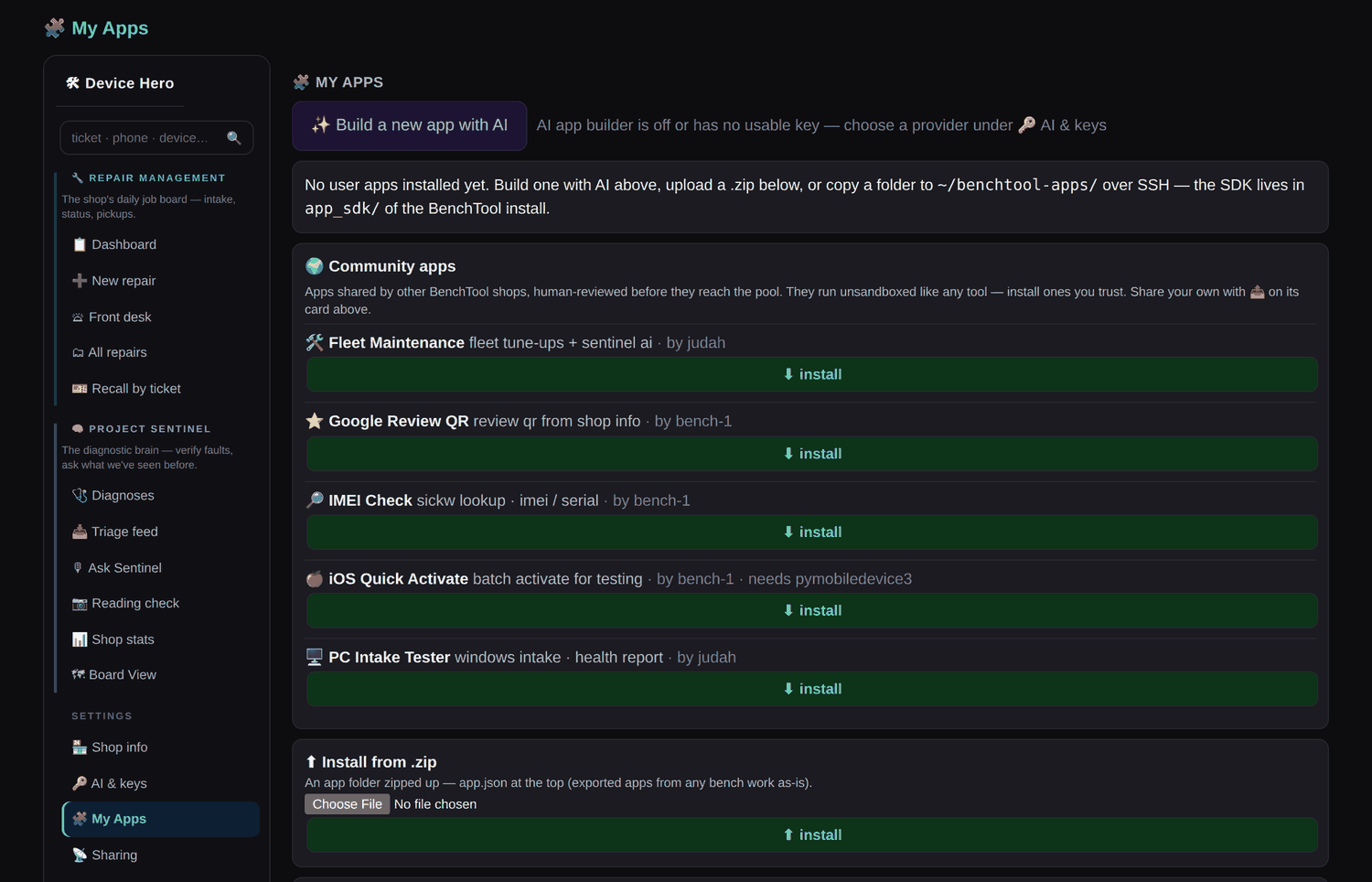
- IMEI Check — IMEI and serial lookup at the counter, before you quote the job.
- Google Review QR — turns your shop’s review link into a QR on the pickup screen.
- iOS Quick Activate — batch activation for testing a bench full of refurbished phones.
- PC Intake Tester — a Windows intake pass that ends in a health report you can show the customer.
- Fleet Maintenance — scheduled tune-ups for shops that look after a fleet of machines.
Two of those came from one shop and three from another. None of them are tools we would have thought to build, which is the entire argument for having a store at all: your bench gets useful in directions we never planned. Apps install outside the BenchTool install, so a firmware update can’t clobber them and they can’t break an update, and each one writes its own log like any built-in tool. They run unsandboxed, exactly like the built-in tools do — so install the ones you trust, the same judgement you’d apply to any bench utility.
The Math Takes About Nine Seconds
You already know your ticket average. Run it against $400.
| Job You Already Take In | Typical Shop Ticket | Units to Cover a Pi 5 Full Kit |
|---|---|---|
| PS5 HDMI port replacement | $150 – $200 | 2 – 3 |
| PS5 no-power board-level repair | $180 – $250 | 2 – 3 |
| iPhone board-level / no-boot diagnostic + repair | $200 – $350 | 2 |
| Controller drift hardware fix | $60 – $90 | 5 – 7 |
| Data recovery off a failing drive | $150 – $400 | 1 – 3 |
The Part That Actually Pays
The hardware cost is the small number. The real return is the hour you stop losing per job:
- Bank one hour a week. At a $75/hr bench rate that’s $3,900 a year. The BenchTool costs $400. Once.
- Quote on the spot. A decoded Syscon log turns “we’ll have to look at it” into a priced repair at the counter, while the customer still wants to say yes.
- Kill dead jobs early. Read battery health or decode a panic log up front and walk away from an uneconomical board before you’ve sunk two hours into it.
- Pay once. Compare that to a $1,000+ proprietary diagnostic console.
Two average console repairs. That’s the whole invoice.
Everything after that is margin you weren’t capturing.
Pick Your Bench. All Three Ship Assembled and Preloaded.
Same software. Same 65+ tools. Same lifetime updates. The difference is the silicon and how many dongles are in the box.
Pi 3 — UART Starter
For console techs who live in serial logs.
- Raspberry Pi 3
- 800×480 touchscreen
- Full 65+ tool software suite *
- Sentinel shop desk
- USB-UART dongle
- CH341A programmer
- ESP32-S3 logic analyzer
- Lifetime OTA updates
- No recurring fees
Pi 3 — Full Kit
Full board-level work on a budget.
- Raspberry Pi 3
- 800×480 touchscreen
- Full 65+ tool software suite
- Sentinel shop desk
- USB-UART dongle
- CH341A programmer
- ESP32-S3 logic analyzer
- Lifetime OTA updates
- No recurring fees
Pi 5 — Full Kit
The every-day production bench.
- Raspberry Pi 5 — fastest, most future-proof
- 800×480 touchscreen
- Full 65+ tool software suite
- Sentinel shop desk
- USB-UART dongle
- CH341A programmer
- ESP32-S3 logic analyzer
- Lifetime OTA updates
- No recurring fees
* Every unit ships with the complete software suite. Hardware-dependent tools need their dongle: chip programming and PS5 NOR modification require the CH341A; logic capture and UART sniffing require the ESP32-S3. Both are included in Full Kit tiers.
Most Popular — and it’s not close.
The Pi 5 is the one you buy if the BenchTool is going to live on a production bench. More compute headroom, every dongle in the box, and the most future-proof hardware in the lineup — for $50 over the Pi 3 Full Kit. Buy once.
Shipping: $25 flat rate via UPS within the United States.
International orders: additional shipping charges may apply — contact us before ordering and we will quote your destination.
Local pickup in Manor, TX is free — message us before ordering and we will send a pickup invoice with shipping removed.
Payment: Pay by Zelle or Cash App at the prices above, or by PayPal for $15 more — that covers PayPal’s processing fee and gets you their buyer protection. You choose at checkout.
Why two prices? The prices above are what you pay by Zelle or Cash App, straight to Device Hero, LLC. PayPal costs $15 more because it takes a processing fee — in exchange you get their buyer protection, which direct transfers don’t carry. Pick whichever suits you at checkout.
Built Like a Bench Instrument, Not a Hobby Project
Unbox to First Diagnostic
Every unit ships fully assembled with the software preloaded. Plug in power, plug in the dongles, power on. You are not imaging an SD card, editing a config file, or chasing a GitHub README. You supply the device-side cables you already own.
1-Tap OTA Updates. Forever. Free.
New tools, new error-code tables, new console revisions — they land on your bench through a single tap in Settings → Update. No re-imaging. No pulling the SD card. No paid version bumps. Software updates are included for the life of the unit, so the tool you buy on day one keeps growing.
Zero SD-Card Corruption by Design
This is the part most Pi-based tools get wrong. Customer data writes strictly to external USB — never to the Pi’s SD card. Photo extractions, drive images, ddrescue output, and logs all land on removable media you control and hand back. Keeping heavy write traffic off the card is what keeps it alive through the power cycles, brownouts, and hard shutdowns a real repair bench inflicts on hardware — and it means a customer’s data leaves with the customer.
Offline-First Security
The 65+ diagnostic tools run with the network off. Syscon logs, panic logs, and customer device data stay inside your shop by architecture, not by policy. Wi-Fi does exactly three optional jobs: pulling OTA updates, serving Sentinel to your own devices on your own LAN, and — only if you switch it on — reaching Gemini with your API key, loaded from your USB stick. Turn Wi-Fi off and the bench still diagnoses.
Straight Answers
Do I need to re-image SD cards to keep it current?
No. The BenchTool ships imaged and configured. Updates arrive over the air and install in place. The only reason you’d ever touch the card is physical failure — and because customer data never writes to it, that’s rare by design.
How do firmware and software updates actually work — and what do they cost?
Tap Settings → Update. The unit pulls the latest build over Wi-Fi and applies it in one step. Updates are free for the life of the unit, including new tools and new console error-code tables as they’re added. There is no paid upgrade tier.
Can I use my own Gemini API key for the AI log analyzer?
Yes — that’s the only way it works. Google issues a free API key; you drop it on a USB stick and load it from the Settings card. The key stays on your unit, under your control, and you can pull it at any time. The AI layer is entirely optional: all 65+ core diagnostic tools run offline without it.
What cables and adapters do I have to supply?
The device-side cables you already have on your bench — USB-C, Lightning, Micro-USB, and your console serial leads and test hooks. The kit includes the interface hardware that’s hard to source and easy to get wrong: the USB-UART dongle, plus the CH341A programmer and ESP32-S3 logic analyzer on Full Kit tiers.
Is there a monthly subscription?
No. You pay once for the hardware, and the software, lifetime updates, and Sentinel come with it. Nothing recurring, nothing metered. A BenchTool that never sees the internet again still runs all 65+ offline tools it shipped with.
Pi 3 or Pi 5 — does it actually matter?
For serial log decoding on a light bench, the Pi 3 does the job. For a production bench that runs all day, buy the Pi 5 Full Kit — it’s the fastest and most future-proof configuration, and it’s only $50 over the Pi 3 Full Kit.
Do you ship internationally, and how does local pickup work?
The $25 flat UPS rate covers the United States. International orders may incur additional shipping charges — contact us before you order and we will quote your destination, then send a payment link with the correct total. For free local pickup in Manor, TX, message us before ordering and we will issue a pickup invoice with the shipping line removed.
Can I add my own tools, or am I stuck with what ships?
You can add your own. BenchTool includes an App SDK and an App Store built into the launcher. Write a standalone Python script, describe a tool to the AI builder and let it write one for you, or install an app another shop published to the community pool — all three produce the same kind of app, and they appear under Utilities ▸ My Apps. Your apps live outside the BenchTool install, so OTA updates never touch them.
Can more than one tech use it?
Yes. The bench unit is single-operator, but Sentinel serves the repair desk to every phone and PC on your shop Wi-Fi — tickets, live bench status, and the searchable repair database are available to the whole floor without anyone crowding the bench.
Clear the Laptop Off Your Bench.
65+ offline tools. PS5 Syscon decoding, iOS panic analysis, SPI NOR flashing, UART capture, and a shop-wide repair desk — in one 800×480 box that boots in seconds and updates for free, forever.
$25 flat UPS shipping in the US · Free local pickup in Manor, TX · International shipping quoted on request · PayPal checkout · One-time price